Working with Materials
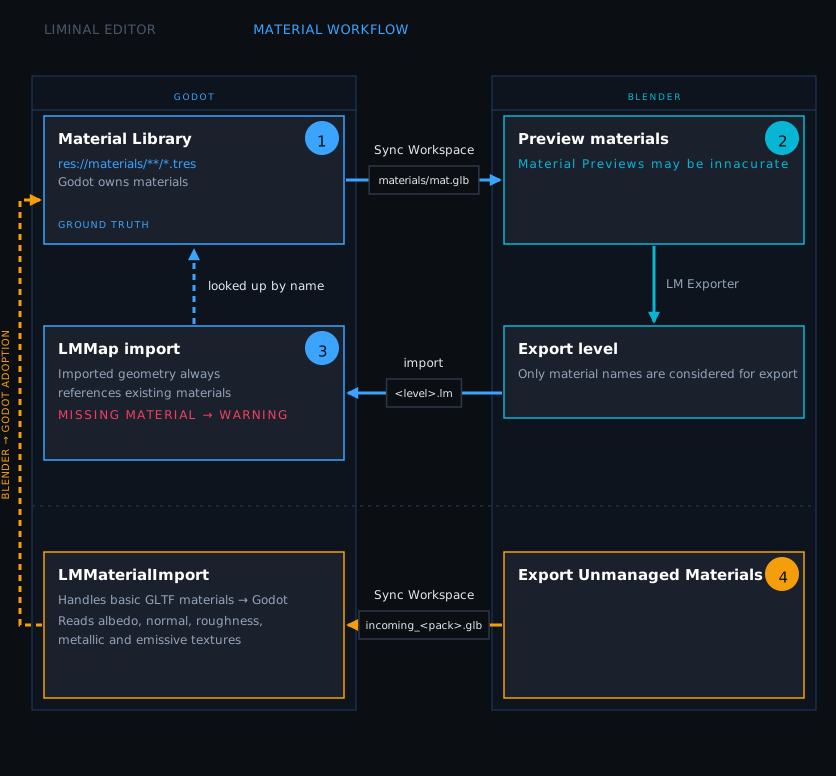
Material handling in a Blender-Godot pipeline is normally awkward. By default, Godot tries to import materials embedded in glTF files, which leads to scattered duplicates and per-asset import scripts. Liminal takes a different approach.
The Liminal Workflow
- Author materials in Godot.
- In Blender, materials are available as previews in the Asset Browser. Drag and drop them onto level geometry.
- On import, Liminal resolves the material references back to the originals you authored in Godot.
The result: materials stay tidy and centralised in Godot. Blender just references them by name.
Configuring Material Directories
Tell Liminal which directories contain the materials you want exposed in Blender. Add them in Project Settings›Liminal Editor›Material Directories.
When you export entity definitions from Godot, the addon scans these directories, finds material resources, and renders previews for each one. The previews appear in Blender's Asset Browser.
Note
Keep Surface materials in their own directory, separate from VFX or other shader materials. This avoids exporting previews you do not intend to assign to level geometry.
Assigning Materials in Blender
Since v0.6 you can also use a Material Palette. To bring up Material Palette press Shift⇧+M while the Toolbar›LM Toolkit tool is active.
Paint Mode Hotkeys
| Key | Action |
|---|---|
| click / drag | Paint across hovered faces and objects |
| Ctrl⌘+ | Paint every face of the hovered object |
| Shift⇧+ | Paint every face on that object sharing the hovered face's current material (retexture flood) |
| Alt⌥+ | Eyedropper: sample the face's material and UV scale |
| M | Reopen the Material Palette |
| U | Toggle UV projection on paint |
| . | Frame the hovered face |
| Esc | Exit paint mode |
Adopting Materials
If you have materials setup in Blender and not in Godot, Liminal has tools to adopt them automatically. The adoption takes any materials not managed by Liminal and tranfers them from Blender to Godot.
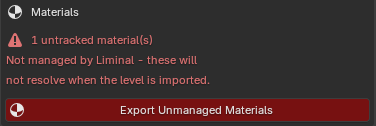
To adopt materials:
- LM Export›Export Unmanaged Materials
- Entities›Sync Workspace or Project›Tools›Liminal Editor›Sync Materials Only
- LM Config›Reload Manifest
From here the materials behave like any other Liminal material: they resolve by name on
import, and the generated .tres can be edited in Godot.
Warning
GLTF has limited interoperability in terms of converting Blender materials to Godot. It guarantees to support a Principled BSDF node with Albedo, Normal, Roughness, Metallic, Ambient Occlusion and Emissive textures connected to it. Any more complex material graphs may not produce expected result in Godot. The adoption workflow helps with initial setup of new materials in Godot. If your game requires sophiticated shaders and effects on the geometry, you still need to set it up manually.
Note
Liminal syncs only modified materials by default but you can force a complete resync with Project›Tools›Liminal Editor›Force Full Resync button.