Configuring Imported Geometry
When Godot imports a .lm file, LMMap turns every non-entity mesh into a MeshInstance3D plus an optional CollisionShape3D. You control how that geometry behaves in three layers - from zero-code defaults, through authored tags, to full scripting.
1. World Geometry Defaults (no code)
Select the LMMap node in Godot and open the World Geometry Defaults group in the inspector. These apply to all non-entity world geometry on every import:
| Property | What it sets |
|---|---|
| Geo Collision Layer | Physics layer of the shared world StaticBody3D. |
| Geo Collision Mask | Physics mask of the world body. Default: empty - static world scans nothing. |
| Geo Visibility Layer | Render layers of every world mesh. |
| Geo Gi Mode | Global illumination mode: Disabled / Static / Dynamic. Default: Static. |
| Geo Default Material | Material for surfaces with no material assigned in Blender. Default: a neutral grey matching Blender's. Surfaces whose Blender material has no Godot counterpart always show the BAD material. |
| Geo Default Physics Material | Friction / bounce for the world body. |
For most levels this is all you need.
2. Geometry Tags
Tags are named markers you attach to objects in Blender and react to in Godot. You can extend Liminal's processing pipeline with custom functionality by implementing LMMap hooks. Hooks provide extension points at various stages of the import pipeline and let you customize importer's default behavior.
Define the tag set (Godot)
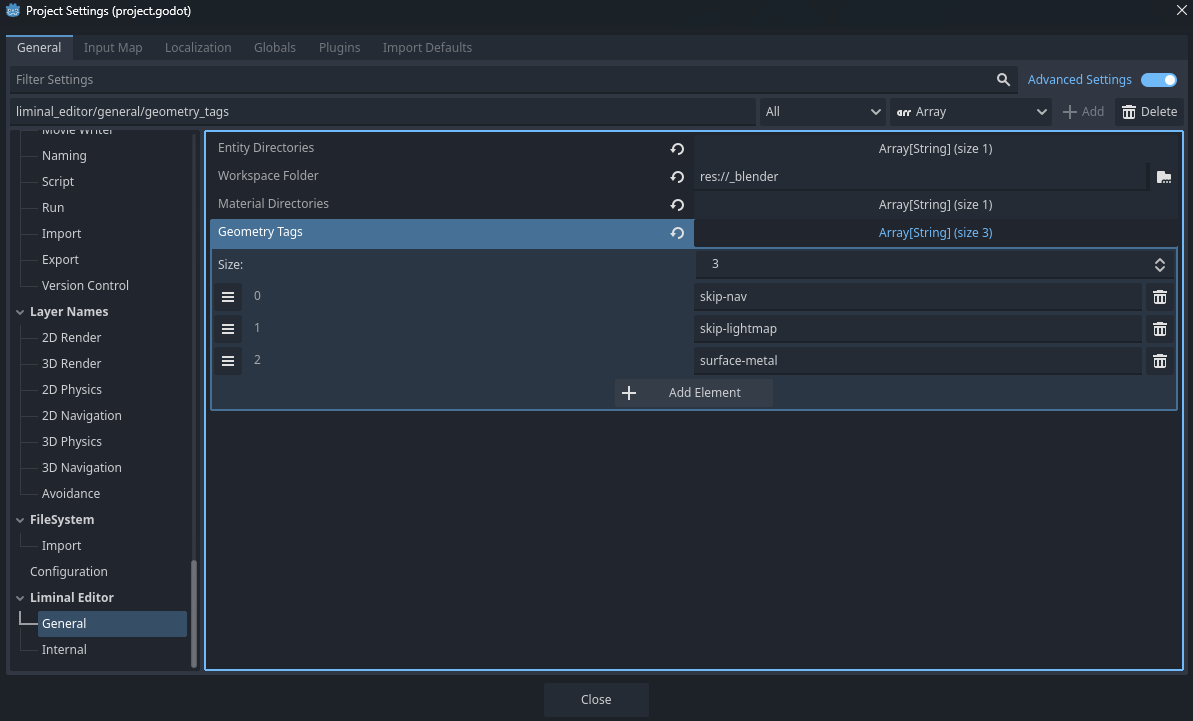
In Project›Project Settings (enable Advanced Settings), open Liminal Editor›General›Geometry Tags and add the tags your project uses, e.g. nav, boundary, ice.
Then click Sync Workspace on the Liminal Editor toolbar so the set is written into entities.json.
Assign tags (Blender)
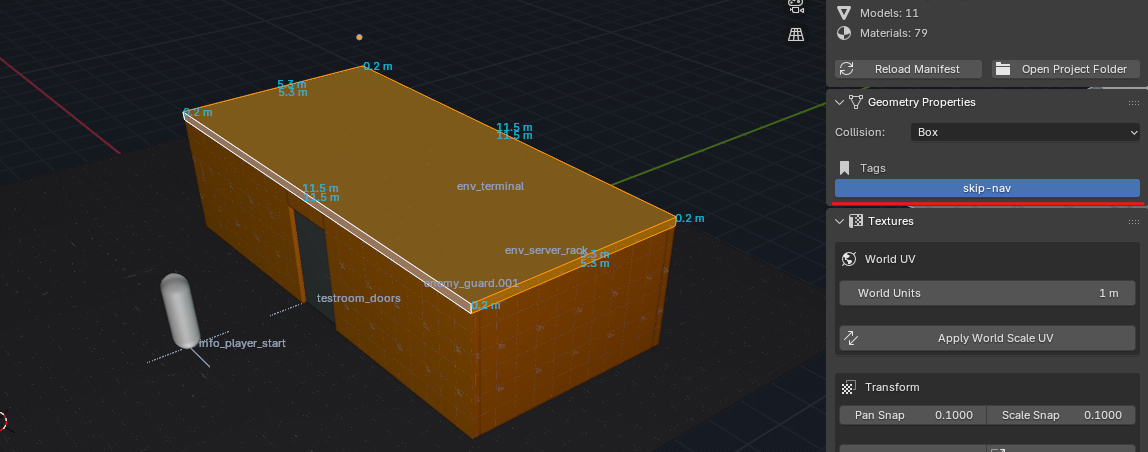
After Reload Manifest, select one or more GEO objects and open LM Geometry Properties. The defined tags appear as toggle buttons below the collision dropdown - click to add or remove them across the whole selection. The tags travel in the .lm file.
Note
Tags do nothing on their own. They are consumed by Map Setup Hooks (below). A tag that no hook reacts to is simply ignored. Tags assigned in Blender but no longer present in the Godot set show with a (?) suffix so you can clear them.
3. Map Setup Hooks (scripting)
For behaviour the defaults can't express - clustering colliders, building a navmesh, invisible boundaries, per-tag physics materials - assign an LMMapHooks resource to the LMMap's Hooks slot.
Create a script extending LMMapHooks, override the stages you need, save it as a resource, and drop it in the slot. The resource is duplicated on each import, so a hook may keep scratch state in its own members during a single build.
Available stages
| Hook | Fires | Return |
|---|---|---|
on_setup_begin(map) |
Before any node is processed | - |
on_geo_mesh(map, mi, tags) |
Per world mesh, after defaults | the node, a replacement, or null to drop the visual |
on_geo_body(map, mi, cs, default_body, tags) |
Per collider, to choose its body | default_body (optionally configured), another CollisionObject3D, or null to drop collision |
on_geo_collision(map, mi, cs, tags) |
Per finished CollisionShape3D |
the node, a replacement, or null to drop collision |
on_entity_ready(map, entity, classname) |
Per instantiated entity | - |
on_setup_complete(map) |
After everything is built | - |
Examples
Invisible walls - remove mesh but keep the collision:
func on_geo_mesh(map, mi, tags):
    if "boundary" in tags:
        return null
    return mi
Backface collision on trimesh floors:
func on_geo_collision(map, mi, cs, tags):
    if "backface" in tags and cs.shape is ConcavePolygonShape3D:
        cs.shape.backface_collision = true
    return cs
Give an icy tag its own low-friction body, reused across every icy surface:
var _ice_body: StaticBody3D

func on_geo_body(map, mi, cs, default_body, tags):
    if "ice" in tags:
        if _ice_body == null:
            _ice_body = StaticBody3D.new()
            var pm := PhysicsMaterial.new()
            pm.friction = 0.05
            _ice_body.physics_material_override = pm
        return _ice_body
    return default_body
Tip
Use on_setup_complete(map) for anything that needs the whole level to exist first - for example baking a NavigationRegion3D once all floor colliders are present.
The full contract for each stage is documented inline in lm_map_hooks.gd.
@tool
class_name MyMapHooks extends LMMapHooks

## End-to-end navmesh integration using the "skip-nav" geometry tag.
##
## All world geometry is navigable by default (NavMesh collision layer).
## Surfaces tagged "skip-nav" are excluded: they are clustered under a dedicated
## StaticBody3D ("NavCollision") with the NavMesh layer stripped, so the bake
## ignores them. The default world body joins the NAVMESH group so the bake
## captures all untagged surfaces. On import finish a NavigationRegion3D is built
## from `navigation_mesh` and baked against that group.

## Physics layer 9 = "NavMesh" (project.godot). Stripped from skip-nav surfaces.
const NAV_PHYSICS_LAYER := 1 << 8
## Group the baked region sources its geometry from.
const NAV_GROUP := &"NAVMESH"

## NavigationMesh template for the baked region - configure agent radius/height,
## cell size, max slope, etc. here. Left null, no region is built.
@export var navigation_mesh: NavigationMesh

# Per-run scratch (the hooks resource is duplicated each import).
var _nav_body: StaticBody3D


func on_geo_body(map: LMMap, _mesh_instance: MeshInstance3D, _collision_shape: CollisionShape3D, default_body: CollisionObject3D, tags: PackedStringArray) -> CollisionObject3D:
    if "skip-nav" not in tags:
        return default_body


    default_body.add_to_group(NAV_GROUP, true)
    if _nav_body == null:
        _nav_body = StaticBody3D.new()
        _nav_body.name = "NavCollision"
        # Match the world body but remove the NavMesh layer - bake ignores these surfaces.
        _nav_body.collision_layer = default_body.collision_layer & ~NAV_PHYSICS_LAYER
        _nav_body.collision_mask = default_body.collision_mask
        _nav_body.physics_material_override = default_body.physics_material_override
        # Nest under the default body so it stays inside the NAVMESH subtree.
        default_body.add_child(_nav_body)
        _nav_body.owner = map.owner if map.owner != null else map
    return _nav_body


func on_setup_complete(map: LMMap) -> void:
    # No navigation_mesh set, or no skip-nav surfaces found - nothing to bake.
    if navigation_mesh == null or _nav_body == null:
        return
    var region := NavigationRegion3D.new()
    region.name = "NavRegion"
    # Duplicate so bake settings don't mutate the shared template resource.
    var nav: NavigationMesh = navigation_mesh.duplicate()
    nav.geometry_parsed_geometry_type = NavigationMesh.PARSED_GEOMETRY_STATIC_COLLIDERS
    nav.geometry_source_geometry_mode = NavigationMesh.SOURCE_GEOMETRY_GROUPS_WITH_CHILDREN
    nav.geometry_source_group_name = NAV_GROUP
    region.navigation_mesh = nav
    map.add_child(region)
    region.owner = map.owner if map.owner != null else map
    region.bake_navigation_mesh(false)
In Blender, the building shell is tagged skip-nav in LM Geometry Properties so its walls and roof are kept out of the bake:
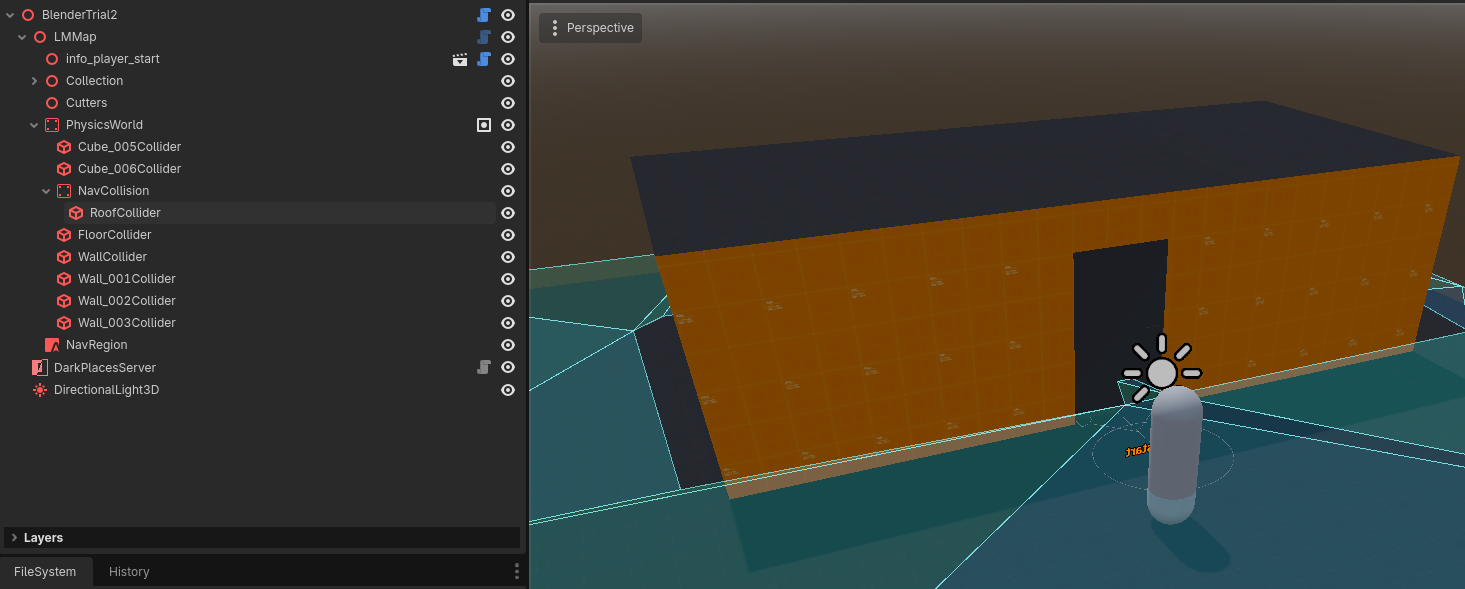
On import, Godot clusters those colliders under the NavCollision body (NavMesh layer stripped) and bakes a NavigationRegion3D from every untagged surface - the floor is navigable, the roof is not: