Liminal Script
Liminal Script is a node based editor for wiring entities together. Functionally it is similar to linking entities in the 3D view but the dedicated View makes it easier to create implement complex scenarios. Open a Node Editor area and pick Liminal Script from the tree-type dropdown; if your scene has entities, the canvas populates itself.
This is not a coding framework
Liminal Script is meant to create relationships between entities in your scene. It doesn't impose any programming frameworks or code architecture. During import, all relationships are imported into Godot as String references. To make this wiring functional, you still need to integrate them with your gameplay systems.
What It Is
The canvas has two kinds of nodes, and a label always sits between a sender and a receiver - entities never connect to each other directly.
- Entity node - one per entity object in the scene, synced automatically. Its
destinationproperties become output pins (right, "I point at X"); itssourceproperties become input pins (left, "I am called X"). - Label node - a named bus. Senders fan into its left socket; receivers fan out of its right socket. The text field is the label's value, the string written to every connected property.
These pins come straight from the entity's source and destination properties. An entity has a single source (its name), but can have several destination properties - so one input pin, but potentially many output pins.
sender output → label input … label output → receiver input
Types of nodes
Entity node
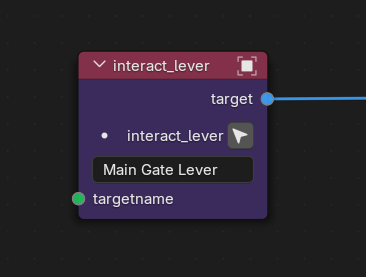
- Header - the object's name.
- Classname - the entity's type, shown below the header.
- Focus button (crosshair icon) - selects the object and frames it in the 3D viewport.
- Description - edits the object's Notes property inline.
- Input pins (left, green) -
sourceprops: "I am called X." - Output pins (right, blue) -
destinationprops: "I point at X."
Label node
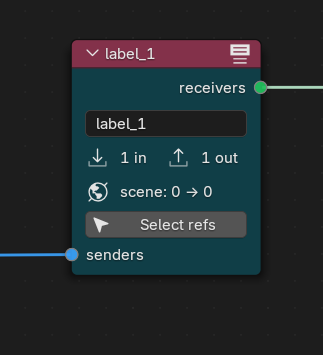
- Name - the label's value, the string written to every connected prop. Editing it renames the label and rewrites all connected objects' props instantly.
N in/N out- how many connections pass through this node instance.scene: X → Y- how many senders and receivers reference this name anywhere in the scene. This distinguishes a label that's empty here but still live elsewhere from a truly orphaned one (scene: 0 → N).- Select refs button - selects every scene object that references this label name, whether or not it's wired to this particular node.
- Left socket - senders fan in here. Right socket - receivers fan out.
How to Use
Add a label
Press Shift⇧+A → Label. A new label appears at the cursor with an auto-generated name. Edit its text field to rename it.
Connect and disconnect
In Blender
- Drag from a sender's output pin to a label's left socket.
- Drag from the label's right socket to a receiver's input pin.
Both ends write to props immediately - the sender's target and the receiver's targetname both get the label's value.
Drag a link away from its socket to disconnect it, or hold Ctrl⌘+ and swipe across links to cut them. Either way clears the prop on the affected objects. The label node stays on the canvas as an empty placeholder.
Fan-in and fan-out
One name, many objects:
- Fan-in - multiple senders can connect into a single label's left socket.
- Fan-out - a single label's right socket can drive multiple receivers.
Multiple labels with the same value
You can place several label nodes that share the same value. On export, every part of the graph with a common label name is joined into one group - at runtime one name is always one broadcast group, regardless of which node instance an edge passed through.
Use this to keep a busy graph tidy: split a large fan-out into a few readable clusters instead of one tangled god-node. (Renaming just one of the instances is also how you deliberately split a shared name into two separate groups.)
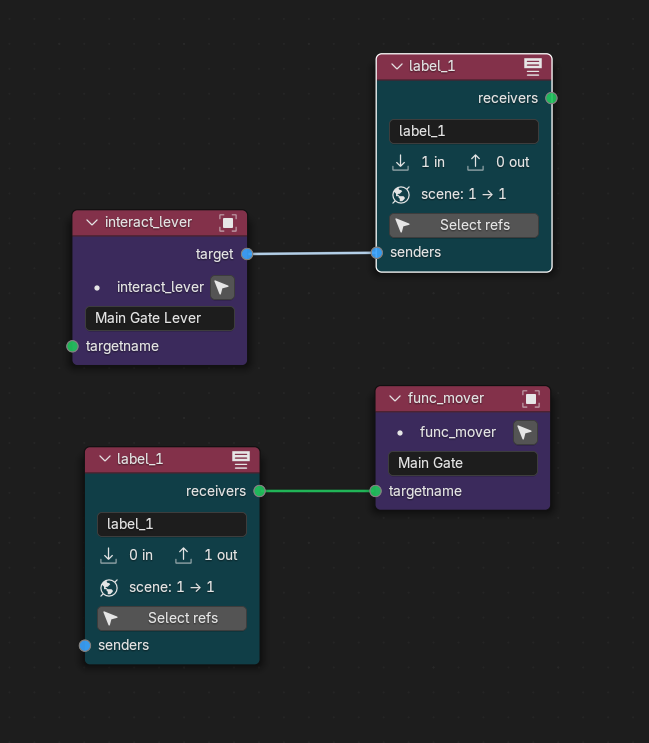
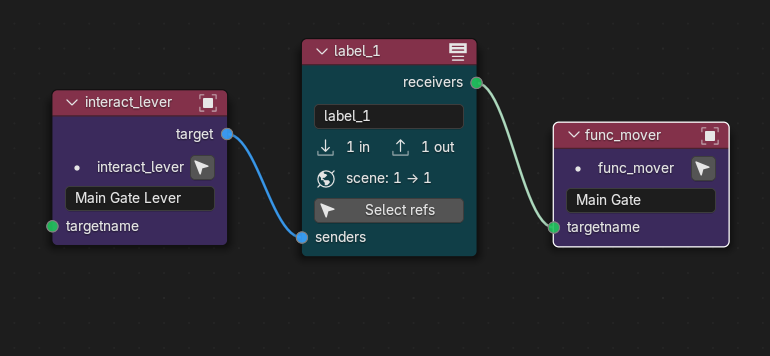
These two networks produce identical results - the layout differs, but the underlying names are the same, so they export to one broadcast group.
Unconnected labels
A label with nothing wired to it is not exported, but it stays on the canvas - handy as a placeholder while you build out a wiring chain.
Comment blocks
Press Shift⇧+A → Comment to add a frame. With nodes selected, it shrinks to enclose them; otherwise it drops at the cursor. Select the frame and press F2 to rename it. Frames are pure presentation and never affect wiring.
How It Works
Entities already carry relationships through their source and destination properties: an entity with target = "alarm" points at every entity with targetname = "alarm". This name-based matching is the ground truth, and it's the same wiring you'd set by hand in the property panel.
Liminal Script is a node editor layered on top of that entity system. It reads the props to draw the graph, and writes your edits straight back to the props. The node tree itself stores only presentation - node positions, comment frames, and how labels are grouped - so the wiring lives with the entities, not the canvas. Press Sync in the header to rebuild the graph after changing things outside it.